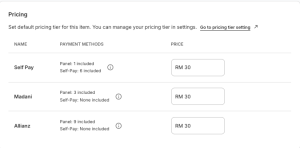
Creating Price Tiers
Price Tiers allow you to set different selling prices for each service or medication.
Common Clinic Price Tiers
Most clinics typically use at least two types of Price Tiers:
-
Self-Pay
-
Panels
Tips for Panels
💡 If your panels have different selling prices, create a separate price tier for each panel.
Example:
-
Self Pay
-
PM Care
-
AIA
-
Medkad
💡 If your panels share the same selling price, you can group them under one price tier.
Example:
-
Self Pay
-
Panel A: PM Care, AIA, Medkad
-
Panel B: Madani, PEKA B40
Steps to Create a Price Tier
-
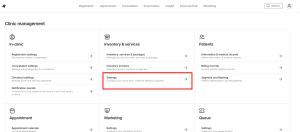
Go to Clinic Management > Inventory & Services > Settings.
-
Click Add Price Tier.
-
Enter a Name for the tier.
-
Select the Payment Method.
-
Example: Self-Pay / Panel (AIA, PM Care, etc.)
-
-
Click Save.
- Next, you may set the selling price for this particular tier at your medications or services: