
How to Collect Reviews with Yezza Review
This article is only applicable if you have completed all review settings.
Collecting reviews is a powerful way to build trust with your patients and improve your clinic’s online presence. Yezza Review offers multiple ways to encourage patients to leave feedback.
1. Print Yezza Review QR
Display your Yezza Review QR code at your front desk so patients can easily scan and leave a review.
Steps:
-
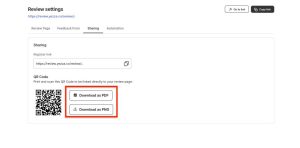
Go to Clinic Management > Review > Settings > Sharing
-
Click Download as PNG
💡 Tips:
-
Make your QR more attractive by designing it in Canva or other editing tools before printing.
-
Place it in visible spots like the reception counter or waiting area.
2. Automate Review Collection
Let Yezza automatically send review invitations to patients after their visit. No manual effort needed.
Steps:
-
Go to Clinic Management > Review > Settings > Automation
-
Turn on Automation
-
Choose Email as the sending method.
3. Use WhatsApp to Ask for Reviews
Boost engagement by sending review invitations directly via WhatsApp.
Steps:
-
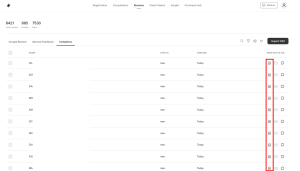
Go to Review > Invitation tab
-
Click the WhatsApp icon to send the invitation
4. Be Proactive in Asking for Reviews
Encourage your staff to personally request reviews from patients. Direct interaction often works best!
💡 Tips & Methods:
-
Set a daily target (e.g., 3 reviews/day = 90 reviews/month).
-
Offer small incentives (discounts, free gifts) for reviews — best used when your Google Profile is new or rating is low.
-
Reward staff who successfully collect reviews from patients.
5. Add Customers Manually in Yezza
If you are not using Yezza CMS or Yezza Appointment, you can still collect reviews by adding customers manually.
Steps:
-
Go to Review tab > Get More Review
-
Enter the customer’s name & phone number
-
Click Save
-
The customer will now appear in your Invitations tab
✅ With these methods combined, your clinic can build a steady flow of genuine reviews that strengthen trust and attract more patients.