
How to Edit Medicine Stock Count
This article explains how you can update or adjust your clinic’s medicine stock count.
⚠️ Note: All users can access/edit medication settings only if the Admin has granted permission for the Clinic Management role.
Steps
-
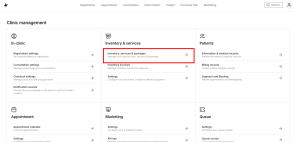
Go to Clinic Management > Inventory, Services & Packages
-
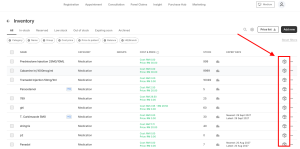
Search for the medicine name
-
Click the box icon to open the Stock Action window
-
Choose the appropriate Stock Action to update your stock:
-
Stock Receive → Add newly purchased stock
-
Inventory Re-count → Overwrite stock with a new quantity
-
Damage → Deduct stock for expired/damaged medicines
-
✅ Once updated, your stock count will reflect the latest changes immediately.