
How to Verify Payment Methods and Panel Lists
This article explains how to check and manage the payment methods and panels offered at your clinic.
Steps
-
Go to Clinic Management > In-clinic > Checkout Settings.
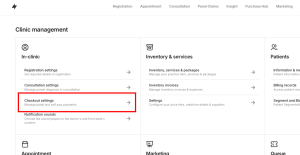
-
Verify all your Panels and Self-Pay payment methods listed.
-
To add more:
-
Click Add New to create a new payment method.
-
Click Add Panel to include additional panels.
-
-
Click Save to confirm your changes.
✅ Once verified, patients will see these payment options during registration or checkout.
Next: Verify Price Tier